

Krea Realtime Edit makes "Drawing" easier for artists
How Krea’s Realtime Edit turns your worst sketches into pro-level concept art

"Go pick up a pencil." It’s the internet’s favorite comeback for anyone using AI. Usually, it’s meant as a shut-down.
But with Krea’s new Realtime Edit engine, picking up a pencil (or a mouse, or a stylus) is no longer a chore, it’s a superpower. In five minutes, I went from 'stick-figure scribbler' to 'cyberpunk concept artist.'
The most hated meme in art just became the best way to prompt.
Krea Realtime Edit isn’t just a faster generator; it’s a canvas-based interface that allows for instant iteration. By combining text prompts, rough sketches, and image-to-image influences, it shifts the creative process from “batch processing” to “live exploration.”
The power of the Real-Time canvas
At its core, Krea allows you to manipulate visual content instantly. The AI responds as fast as you move your mouse. This is a… dare I say it… game-changer for creators who need to prototype concepts in seconds rather than hours.
To put this to the test, I spent just five minutes exploring different styles and workflows. Here is what Krea Realtime Edit can do:
1. From 2D concept to 3D render
In this first test, I uploaded a stylized 2D illustration (originally generated in Midjourney) of a cybernetic woman with oversized mechanical fists.
The Workflow: I simply typed “3D art of woman” into the prompt bar.
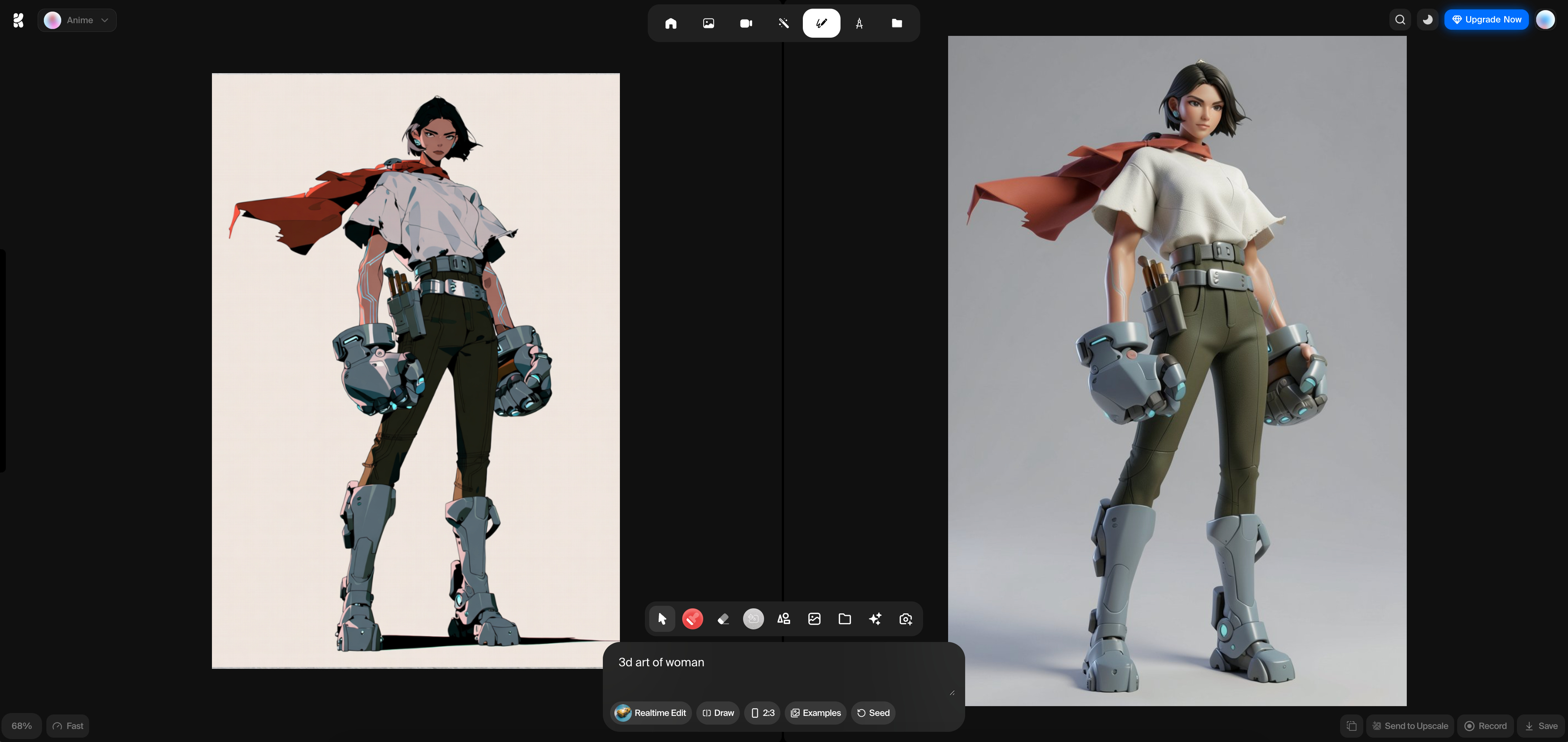
The Result: Krea instantly interpreted the complex 2D shapes and translated them into a high-fidelity 3D model aesthetic. Notice the lighting on the mechanical gauntlets and the texture of the fabric; the AI maintained the character’s silhouette and pose perfectly while completely overhauling the material properties.
2. From stick figure to masterpiece
This is perhaps the most impressive feature for non-artists. I drew a very basic, beige-colored silhouette of a person waving.
The Prompt: A full-body futuristic editorial character illustration set in a pale neutral studio environment, modern Anime art, Young cyberpunk man, looking at his robotic hand, dressed with a red tshirt, black sport pants, military boots, and black emo messy hair, white background, Controlled studio lighting creates soft rim highlights along her cheekbones, jawline, hair, and the spectral forms, with minimal motion suggesting quiet inevitability rather than aggression. Refined yet enigmatic presence, reimagined through high-fashion futurism, restrained jewel-toned palette accented with soft highlights, precise linework, cinematic minimalism.
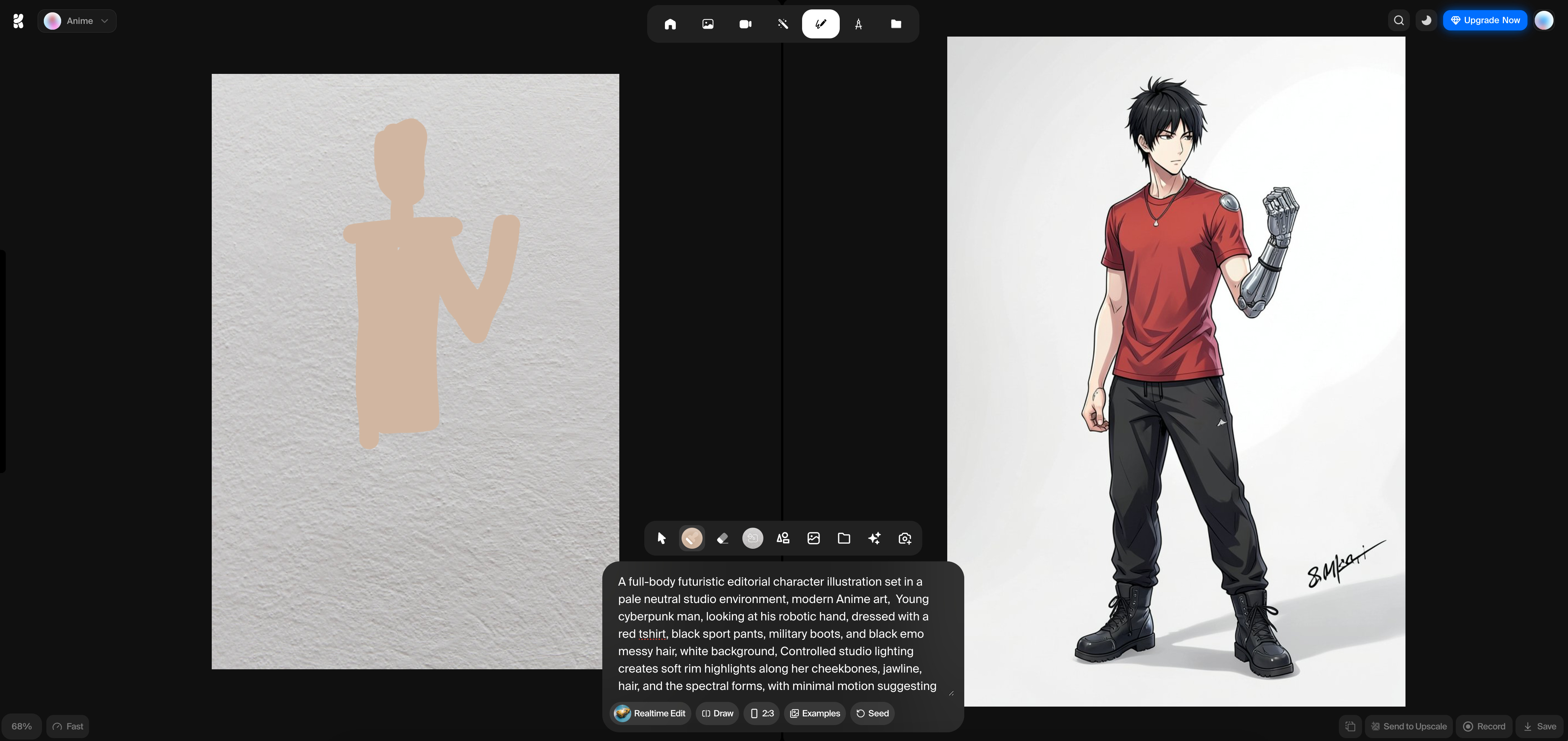
The Result: Despite my drawing being little more than a “blob,” Krea used the sketch as a positional guide. It understood that the “arm” I drew was where the robotic hand should be. The result is a clean, professional anime-style character that perfectly matches the complex lighting and fashion cues requested in the prompt.
3. Real-Time graphic design
Logos often require “flavor” that is hard to get right in traditional software without hours of layer masking.
The Prompt: Neuronomicon Logo with fire
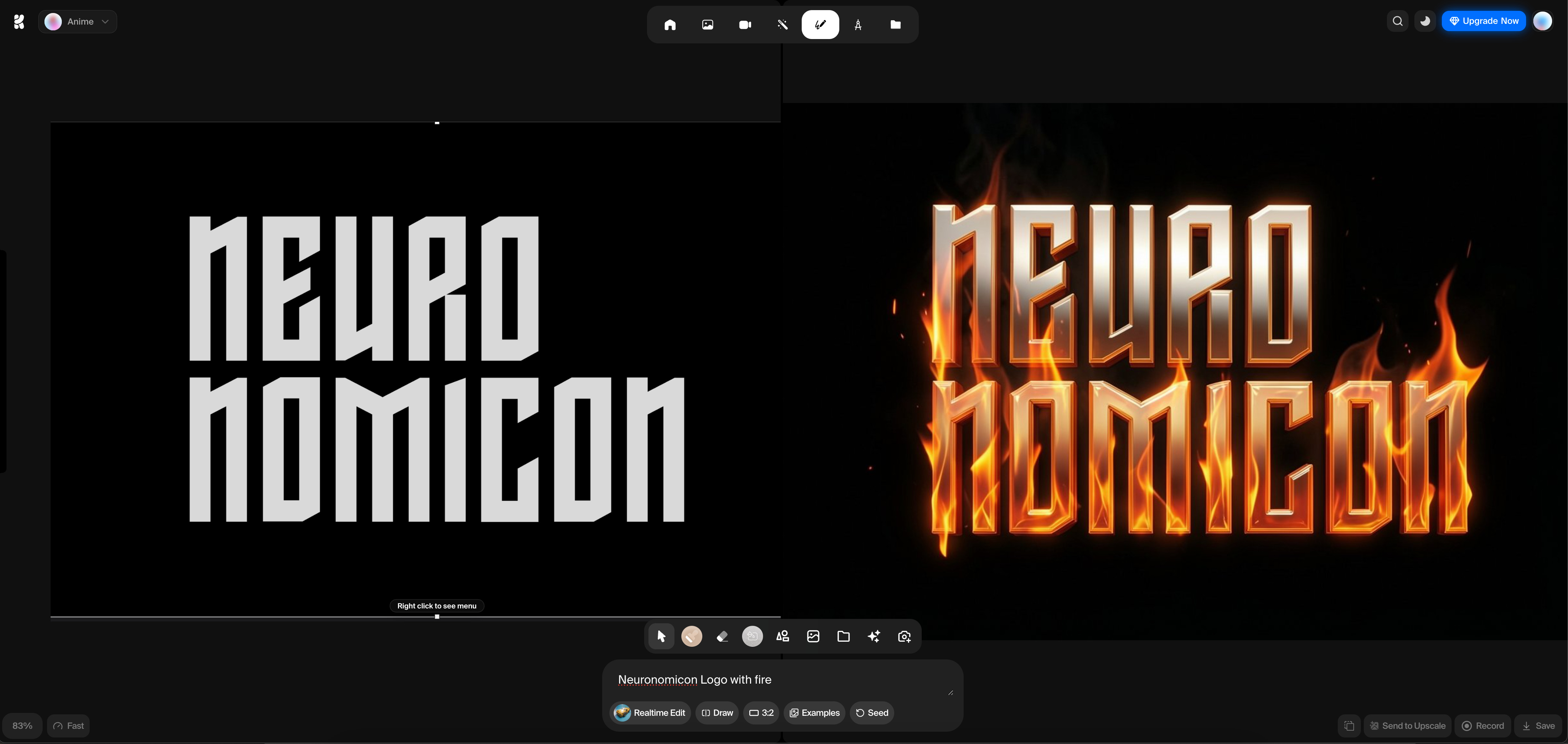
The Analysis: I started with a flat, white-on-black text logo. In real-time, as I added the prompt, Krea wrapped the typography in realistic volumetric flames. It didn’t just place fire behind the text; it integrated the glow and the metallic reflections onto the letters themselves, turning a flat asset into a cinematic title card instantly.
All this is cute and everything. But can you create a specific scene for your videos?
Dumdumdumdum…
4. Scene composition and positional control
Finally, I tested how Krea handles complex environments by combining a Midjourney “headshot” with a rough structural sketch.
The Workflow: I placed a generated face in the corner and used “blobs” to define a body sitting on a bench with one leg up. It was a very iterative (and easy) process.
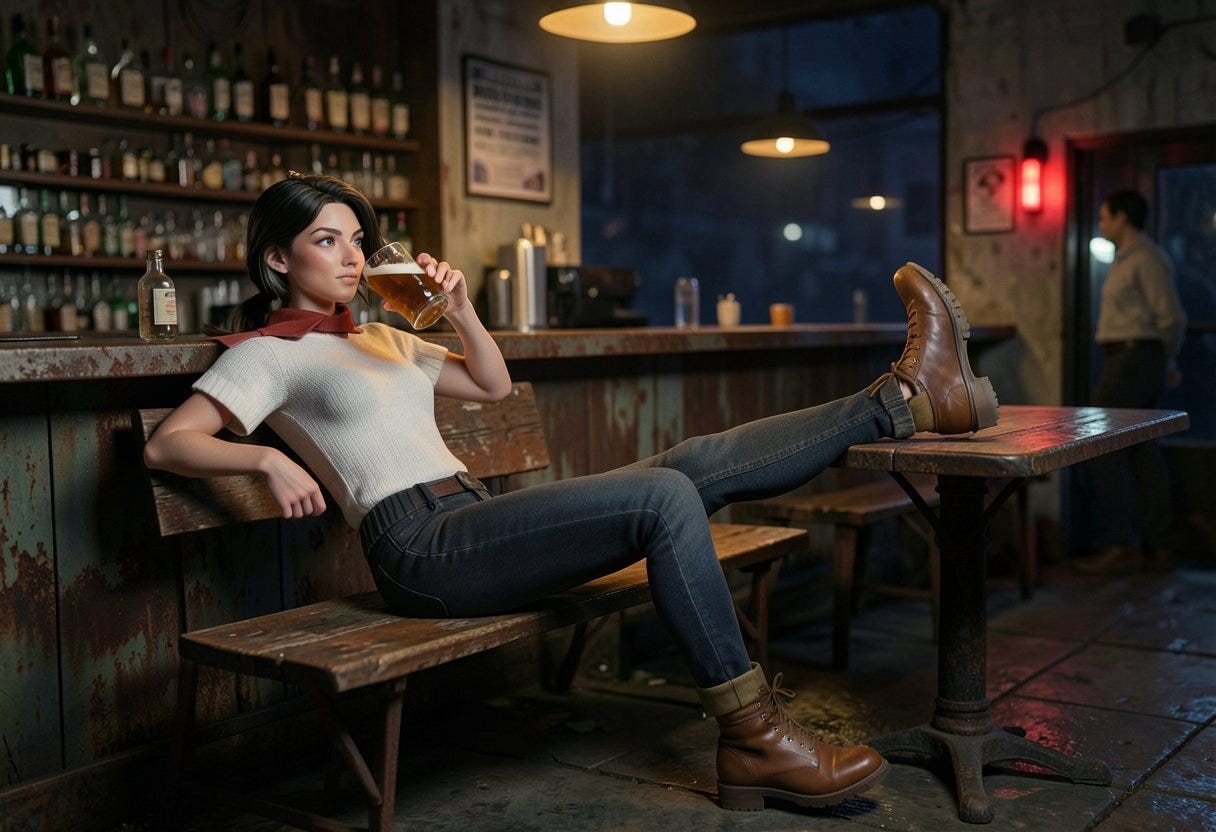
The Prompt: 3d art, woman sitting in the bench of a rusty bar, one foot on top of the table, the other foot on the floor, wearing military brown boots, drinking a beer, night time, bad lights, arm on the back of the bench.
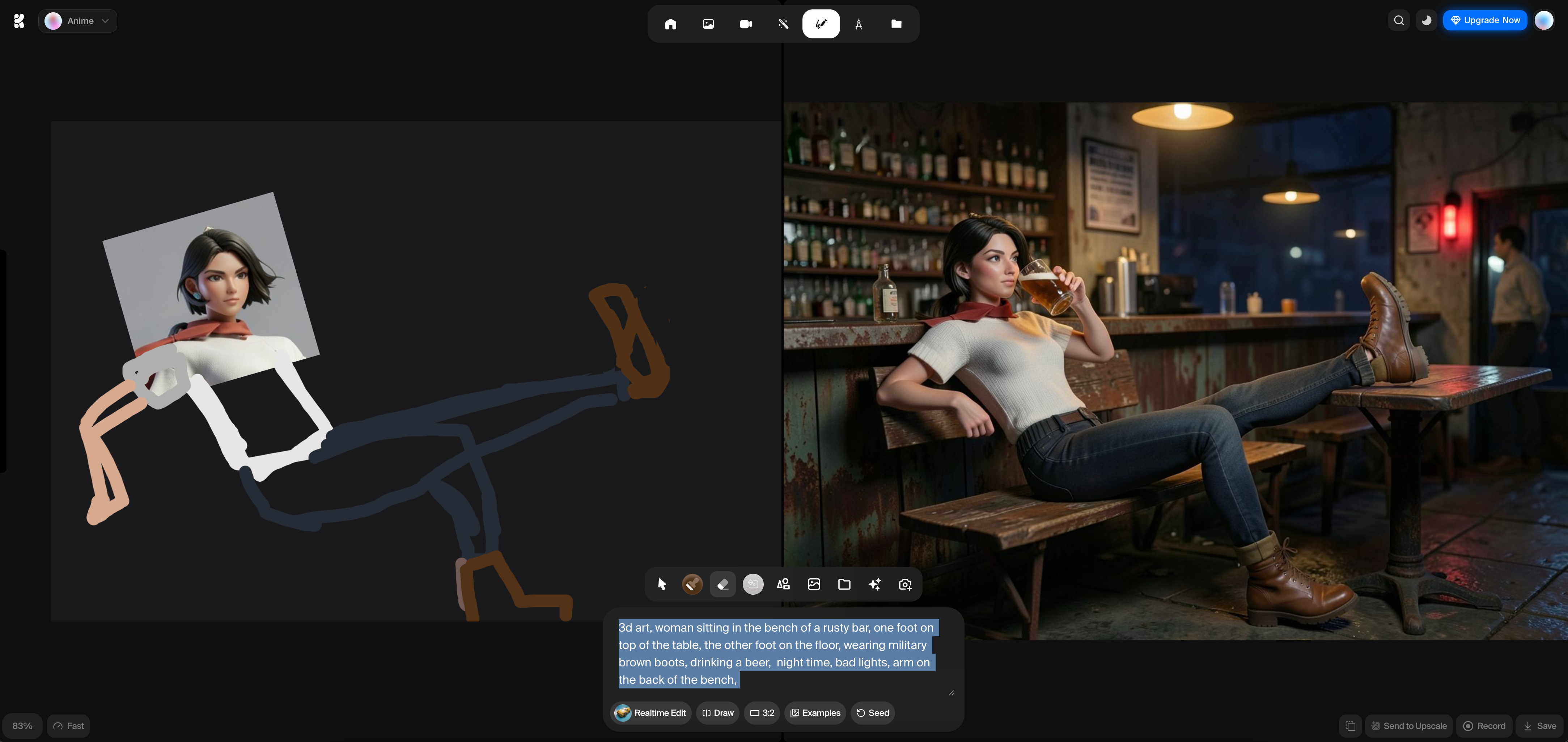
The Analysis: This shows Krea’s ability to “fill in the gaps.” It took the character’s face and projected it onto the body I sketched. It understood the physics of the leg resting on the table and translated my dark scribbles into a moody, atmospheric bar scene with realistic lighting and depth.
Why this matters
Krea Realtime Edit is easy and fast. And it is lowering the barrier to entry for creators who want to experiment without the “prompt-and-wait” fatigue.
It isn’t just about the final image; it’s about the flow state, the ability to see your ideas evolve the moment you think of them.
Really smart observation about flow state vs batch processing. The instant feedback loop changes the whole creative dynamic, its not just faster iteration but actually lets you explore tangents you'd normally skip. Spent years optimizing prompt syntax when maybe the real unlock was always tighter visual control.